Raise the alarm with one click.
A medical emergency, aggressive behaviour or a security concern — sometimes you need to alert colleagues quickly. SAFE is a simple Windows PC application that lets staff raise an alert with a click. Colleagues get an on-screen notification and can respond, so you know someone is coming to help.
Very cost-effective, easy to install, and one licence covers up to 100 PCs.
Try it: press the SAFE button
A safe demo – no alert is sent
Reception PC
Click the button to raise an alert.
Alert sent at . Waiting for a colleague…
Office Manager responded. Help is on the way.
Office Manager PC
SAFE PANIC ALERT
Urgent assistance is required for
Reception PC
Received at:
Alert accepted
Logged at
Relied on by GP practices, council offices, solicitors, schools and many other public-facing organisations.

When you need help, you can’t always pick up the phone.
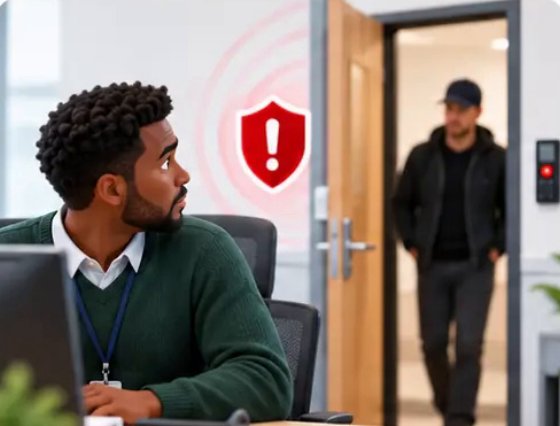
Front-line staff deal with difficult moments every day. SAFE lets them call for help quietly and instantly, without leaving the person in front of them.


How it works
- Step 1
Press
Double-click the SAFE button on your screen, press your hotkey, or hit the optional USB panic button on your desk.
- Step 2
Alert
Nearby colleagues see an alert on their PC within seconds, telling them exactly where help is needed – “Reception”, “Room 3”, or any name you choose.
- Step 3
Respond
A colleague accepts the alert and comes to help. Every alert and response is logged, giving you a full audit trail.
Martyn’s Law
Can your staff raise the alarm in seconds?
The Terrorism (Protection of Premises) Act 2025, known as Martyn’s Law, requires many public-facing premises (including schools, healthcare settings and council buildings) to have procedures for responding to a terrorist attack. A key part of those procedures is alerting staff quickly so they can evacuate, move people to safety inside, or lock down.
SAFE gives every PC a way to raise that alert instantly and silently, with every alert logged. It isn’t a complete compliance solution on its own, but it can be a practical part of your plan.
Read the official guidance on GOV.UK →The law applies to premises where 200 or more people may be present. Check the official guidance for your situation.
Simple to use. Everything you need.
SAFE does one job and does it well. No complicated set-up, no extra hardware required.
On-screen panic button
Place the SAFE button anywhere on the desktop for instant access.
Instant notifications
Alerts reach colleagues across your network in seconds.
Hotkey activation
Raise an alert discreetly from the keyboard, without touching the mouse.
Smart alert grouping
Only alert nearby or relevant colleagues, not the whole building.
Flexible naming
Name each PC by user, room, department or location, so responders know where to go.
Full event logging
Every alert and response is recorded with a complete audit trail.
Central management portal
Manage users, settings and alerts from one place.
Up to 100 PCs per licence
One licence covers up to 100 PCs on a single site or network.
Cloud and network delivery
Several methods run side by side so alerts always get through.
Optional USB panic button
Add a physical button for quick, reliable activation.

Prefer a physical button?
Add the optional USB panic button for quick, reliable activation when every second counts. Plug it into any PC running SAFE and it’s ready to go.
- Easy to install
- Plug and play
- Highly visible
- Built to last
See SAFE in action
A 20-second look at how SAFE helps staff alert colleagues when they need help at work.
Want the full walkthrough? Our product demo shows set-up, alerts and responses step by step.
One licence. Up to 100 PCs.
A full user licence covers up to 100 PCs on a single organisation’s network or physical location. Telephone support and maintenance are included.
SAFE is priced to be very cost-effective, even for small practices and offices.
SAFE single-site licence
Contact us for a quote
Email sales@safepanicbutton.co.uk or call 01235 831125
- Up to 100 PCs on one site or network
- Telephone support and maintenance
- Full event logging
- Optional USB panic buttons at extra cost
Questions people ask
Which operating system does SAFE run on?
SAFE runs on Windows PCs. It is designed specifically for Windows operating systems.
Is it easy to move the SAFE button?
Yes. The on-screen button can be placed anywhere on the desktop, wherever suits each user.
Do I have to use the mouse to activate the panic button?
No. As well as double-clicking the on-screen button, you can use a designated hotkey or an optional USB panic button.
Can I cancel an alert if I’ve activated it by mistake?
Yes. If you activate an alert by accident, just double-click the button again within about 10 seconds. An alert cancellation message is then sent to every PC.
Do client PCs receive an audible alert?
Yes. When an alert is triggered, all other PCs running SAFE play an audible alert (as long as they have speakers and the volume turned on). The PC raising the alert stays silent.
Will SAFE slow my PC down?
No. SAFE is an extremely small application that uses very little of your computer’s resources.
Do I have to pay for the licence each year?
Yes, there is an annual licence renewal charge. It is kept deliberately low – contact us for a quote.
What support is available if I have any problems?
Telephone support and maintenance are included with your licence. Call 01235 831125 or email support@safepanicbutton.co.uk
Start your free trial today
See how SAFE can improve staff safety and emergency response across your organisation.
Sales and free trials
sales@safepanicbutton.co.ukPhone
01235 831125Existing customers
support@safepanicbutton.co.uk